svg_path


Utilities for working with SVG d and transform attributes, encompassing
parsing, serialization, and geometric manipulation of paths, subpaths, subpath
segments, and transform matrices.
gleam add svg_path@0
import svg_path/parse
import svg_path/serialize

pub fn tidy_path_data(input: String) -> String {
  let assert Ok(path) = parse.path(input)
  let options = serialize.decimal_options(2)

  serialize.path_with_options(path, options:)
}
import gleam/result
import svg_path
import svg_path/parse
import svg_path/serialize

pub fn prepare_for_arc_averse_consumer(
  input: String,
) -> Result(String, parse.Error) {
  use path <- result.try(parse.path(input))

  path
  |> svg_path.path_arcs_to_cubic_beziers
  |> serialize.path
  |> Ok
}
Module Map
svg_path: corePath,Subpath,Segment, andPointtypes, plus construction, editing, geometry, splitting, distances, and intersections.svg_path/parseandsvg_path/serialize: SVG path-data parsing and serialization.svg_path/transform: SVG-style affine transform matrices and geometry transforms.svg_path/transform/parseandsvg_path/transform/serialize: SVGtransformattribute parsing and serialization.svg_path/ellipse: endpoint and center arc data, arc conversion, evaluation, splitting, bounding boxes, and cubic approximation.svg_path/congruency: semantic ordered congruency checks under translation, rotation, and uniform scale.svg_path/area: signed area and SVG fill-rule area for subpaths and paths.svg_path/clip: curve clipping that keeps original geometry inside a filled clipping region without adding closure bridges.svg_path/csg: Boolean union, intersection, and difference for filled paths.svg_path/effects: one-off artistic path effects such as corner rounding.svg_path/convex_hull: convex hulls for segments, subpaths, paths, and point lists.svg_path/basic_shapes: conversions from SVG basic shapes to paths.svg_path/svg: small debugging helper for writing complete SVG documents.svg_path/inspect: stable, non-SVG inspection strings for debugging and tests.
Core Model
The root svg_path module represents SVG path data with Path and Subpath
types, supported by lower-level Segment and Point primitives.
Points
A Point is borrowed from the vec package:
pub type Point =
  Vec2(Float)
Use svg_path.point to create points without importing vec directly:
svg_path.point(10.0, 20.0)
Segments
A Segment is one SVG path segment, expressed in absolute coordinates, i.e.,
not relative to a previous “current point”:
pub type Segment {
  Line(start: Point, end: Point)
  QuadraticBezier(start: Point, control: Point, end: Point)
  CubicBezier(start: Point, control1: Point, control2: Point, end: Point)
  Arc(
    start: Point,
    radius: Point,
    x_axis_rotation: Float,
    large_arc: Bool,
    sweep: Bool,
    end: Point,
  )
}
For Arc, x_axis_rotation is in degrees, matching SVG path data.
Segments can be evaluated, differentiated, and split by their local parameter
t, where 0.0 is the segment start and 1.0 is the segment end:
svg_path.segment_point(segment, at: 0.5)                    // -> Result(Point, svg_path.Error)
svg_path.segment_derivative(segment, at: 0.5)               // -> Result(Point, svg_path.Error)
svg_path.split_segment(segment, at: 0.5)                    // -> Result(#(Segment, Segment), svg_path.Error)
svg_path.segment_between(segment, from: 0.25, to: 0.75)        // -> Result(Segment, svg_path.Error)
svg_path.segments_between(segment, between: [0.25, 0.75, 0.5]) // -> Result(List(Segment), svg_path.Error)
Values outside 0.0..1.0 lead to silent extrapolation along the same algebraic
parameterization. Use _inside variants of the same functions to surface
parameter domain errors instead.
Subpaths
A Subpath is opaque. It internally consists of a start point, a list of
end-to-end segments, and a flag indicating topological closure:
pub opaque type Subpath {
  Subpath(start: Point, segments: List(Segment), closed: Bool)
}
The library guarantees that the first segment, when present, starts at start,
and that the last segment of a topologically closed subpath, when present,
likewise ends at start.
Subpaths with segments == [] can have any value of closed. A Subpath’s
serialization ends in Z/z if and only if closed == True.
Subpaths can be split by local segment addresses:
pub type SubpathParameter {
  SubpathParameter(segment_index: Int, t: Float)
}

svg_path.split_subpath(subpath, at: svg_path.SubpathParameter(1, 0.5))
svg_path.subpath_between(
  subpath,
  from: svg_path.SubpathParameter(0, 0.5),
  to: svg_path.SubpathParameter(2, 0.25),
)
svg_path.subpaths_between(subpath, between: [
  svg_path.SubpathParameter(0, 0.5),
  svg_path.SubpathParameter(2, 0.25),
])
svg_path.subpath_point(subpath, at: svg_path.SubpathParameter(1, 0.5))
svg_path.subpath_derivative(subpath, at: svg_path.SubpathParameter(1, 0.5))
Subpath parameters are strict: segment_index must address a real segment and
t must be inside 0.0..1.0. Unlike segment parameters, subpath parameters do
not extrapolate beyond a segment. The split helpers only return positive-length
pieces: open subpath split lists must be strictly increasing and cannot include
the very start or very end, while closed subpath split lists must be distinct
and cyclically increasing. Use compare_subpath_parameters for plain
segment-index-then-t ordering.
The subpath interval helpers have deliberately narrow roles:
split_subpathsplits one open subpath into two open subpaths.subpath_betweenextracts one positive-length interval; closed subpaths may wrap.subpaths_betweenextracts every interval between a list of split points. For a closed subpath, a single split point returns one open loop, while an empty split list returns an empty list.open_atis the convenience form for opening one closed subpath at oneSubpathParameter.subpath_pointandsubpath_derivativeevaluate a subpath at oneSubpathParameter.
Use svg_path.subpath to construct an open subpath from a nonempty list of
contiguous segments, and svg_path.set_closed to change whether a subpath is
topologically closed; note that set_closed(_, True) may result in an error,
but set_closed(_, False) cannot:
Use SubpathParameter(index, t) for normal forward addresses. Use
from_end_parameter(subpath, segment_index:, t:) to address the subpath as if
its segment order were reversed and convert that address back into the original
subpath’s coordinates.
svg_path.subpath(segments)                  // -> Result(Subpath, svg_path.Error)
svg_path.set_closed(subpath, closed: Bool)  // -> Result(Subpath, svg_path.Error)
Construction succeeds when the required segment endpoints meet. Construct empty
“move-only” subpaths with empty_subpath(at:) where at gives the start of
the subpath.
In the following example the segments return to their starting point
geometrically, but the subpath only becomes topologically closed after
set_closed:
import gleam/io
import gleam/result
import svg_path
import svg_path/serialize

pub fn closed_triangle() -> Result(svg_path.Subpath, svg_path.Error) {
  let a = svg_path.point(0.0, 0.0)
  let b = svg_path.point(10.0, 0.0)
  let c = svg_path.point(5.0, 10.0)

  use subpath <- result.try(svg_path.subpath([
    svg_path.Line(start: a, end: b),
    svg_path.Line(start: b, end: c),
    svg_path.Line(start: c, end: a),
  ]))

  io.println(serialize.subpath(subpath))
  // -> "M 0 0 H 10 L 5 10"

  use subpath <- result.try(svg_path.set_closed(subpath, closed: True))

  io.println(serialize.subpath(subpath))
  // -> "M 0 0 H 10 L 5 10 Z"

  Ok(subpath)
}
Use svg_path.clean_subpath(subpath) to remove zero-length segments from a
Subpath. Note that clean_subpath will preserve at least one zero-length
segment of a nonempty Subpath in all cases, though it will not add any new
segments if segments == [] to start with.
Paths
A Path is a list of Subpath.
pub type Path {
  Path(subpaths: List(Subpath))
}
Construct paths directly via the public variant:
svg_path.Path(subpaths: [subpath])
Retrieve subpaths with svg_path.subpaths(path).
Use path_map_subpaths and path_filter_subpaths to transform or filter a
path’s subpaths.
Use combine_paths to assemble a single Path from a List(Path). The result
of combine_paths(paths) is equivalent to
Path(paths |> list.map(svg_path.subpaths) |> list.flatten).
Use path_start and path_end to get the endpoints of a full path. Empty
paths return Error(EmptyPath); paths with subpaths use the first subpath’s
start and the last subpath’s end, including empty subpaths:
svg_path.path_start(path)
svg_path.path_end(path)
Subpath-Building
Helper functions in the root module let users employ an EndpointPolicy option
to specify different types of error-recovery behavior for non-matching
endpoints:
pub type EndpointPolicy {
  Strict
  Wiggle
  Bridge
  WiggleThenBridge
  Custom(fn(Segment, Segment) -> #(Segment, Segment))
}
Strict is the behavior of subpath, requiring exact endpoint
equality. Wiggle moves nearby endpoints together within the package’s default
wiggle tolerance of 1e-9 while respecting the horizontality and verticality
of Line segments. Bridge keeps existing endpoints in place and inserts a
straight line segment when needed.
WiggleThenBridge, as the name implies, first tries Wiggle before falling
back on Bridge. Custom gives callers a hook for bespoke endpoint
reconciliation.
Functions that accept an EndpointPolicy end in _with. Including:
svg_path.subpath_with(segments, policy: svg_path.Wiggle)
svg_path.append_segment_with(subpath, segment, policy: svg_path.Bridge)
svg_path.join_with([first_subpath, second_subpath], policy: svg_path.WiggleThenBridge)
svg_path.splice_with(subpath, start: Int, delete: Int, insert: List(Segment), policy: svg_path.Wiggle)
svg_path.set_closed_with(subpath, closed, policy: svg_path.Bridge)
Subtracting the _with suffix yields equivalent functions whose policy is
EndpointPolicy.Strict.
Failure to reconcile segment endpoints under a given policy results in a
Discontinuous svg_path.Error variant:
Discontinuous(
  previous_index: Int,
  next_index: Int,
  expected: Point,
  got: Point,
  distance: Float,
)
In the above, expected is the end of a putative last segment, got is the
start of a putative next segment (or first segment of the subpath, for a
closure error), and distance is the distance between the two.
Use the assert_ functions for hand-authored/static geometry where invalid
continuity is a programmer error:
svg_path.assert_subpath(segments)
svg_path.assert_subpath_with(segments, policy)
svg_path.assert_append_segment(subpath, segment)
svg_path.assert_append_segment_with(subpath, segment, policy)
svg_path.assert_join([first_subpath, second_subpath])
svg_path.assert_join_with([first_subpath, second_subpath], policy)
svg_path.assert_splice(subpath, start, delete, insert)
svg_path.assert_splice_with(subpath, start, delete, insert, policy)
svg_path.assert_set_closed(subpath, closed)
svg_path.assert_set_closed_with(subpath, closed, policy)
Custom receives each non-matching adjacent pair as previous and next, and
returns replacement segments for that pair. It is called only when the two
endpoints do not already match. A custom policy can change all aspects of both
segments (e.g. change the .start of the previous segment) without
necessarily triggering an error: errors are generated on final-pass
verification of the returned subpath.
Joining Subpaths
join combines open subpaths into one open subpath. With the default
Strict policy, each subpath’s end point must exactly equal the next
subpath’s start point. Empty open subpaths can act as identity values when
their start points line up. join([]) returns EmptySubpath.
svg_path.join([first_subpath, second_subpath, third_subpath])
Closed subpaths are rejected rather than implicitly opened. This keeps
closedness as explicit topology: if you want to discard it, use
set_closed(subpath, closed: False) first.
Use join_with when you want another endpoint policy:
svg_path.join_with([first_subpath, second_subpath], policy: svg_path.Wiggle)
svg_path.join_with([first_subpath, second_subpath], policy: svg_path.Bridge)
Splicing Subpaths
splice replaces a range of segments while preserving the subpath invariant.
start is a zero-based segment index, delete is the number of segments to
remove, and insert is the replacement list.
svg_path.splice(subpath, start: 2, delete: 1, insert: replacement_segments)
If start + delete extends past the end of the subpath, everything from
start onward is deleted. Negative start, negative delete, and start
greater than the subpath length return InvalidSplice.
With the default Strict policy, the edited subpath must still be continuous,
otherwise Discontinuous is returned with segment indices, points, and
distance. Closed subpaths preserve their closed state. If the splice result is
nonempty, the subpath start is updated to the first resulting segment’s start
point. If the splice result is empty, the previous start point is preserved.
Use splice_with when the splice should use a different endpoint policy:
svg_path.splice_with(
  subpath,
  start: 2,
  delete: 1,
  insert: replacement_segments,
  policy: svg_path.Wiggle,
)
Opening Closed Subpaths
open_at breaks open a closed subpath at a subpath parameter and returns a
single open subpath. The result traverses the whole loop from that point back to
itself:
svg_path.open_at(closed_subpath, at: svg_path.SubpathParameter(2, 0.5))
Use t: 0.0 to open at a segment boundary. A parameter at the final endpoint of
a closed subpath, such as SubpathParameter(length - 1, 1.0), opens at the
first point of the subpath.
The error behavior is intentionally specific:
NotClosedis returned if the subpath is not closed.InvalidSubpathParameter(segment_index, t, length)is returned if the parameter is outside the segment list or outside0.0..1.0.
Reversing Subpaths
Use reverse_subpath to reverse the traversal direction of a subpath while
preserving its closed/open state:
svg_path.reverse_subpath(subpath)
For lower-level operations, reverse_segment reverses a single segment.
Converting Arcs to Beziers
Some SVG consumers and geometry workflows prefer to avoid elliptical Arc
segments. Use the _arcs_to_cubic_beziers function family to replace arcs with
cubic Bezier curves while preserving lines, quadratic Beziers, and existing
cubic Beziers:
svg_path.segment_arcs_to_cubic_beziers(segment)
svg_path.subpath_arcs_to_cubic_beziers(subpath)
svg_path.path_arcs_to_cubic_beziers(path)
Elliptical arcs are approximated with one or more cubic Beziers, split into chunks of at most a quarter turn. The conversion preserves subpath closed/open state. If an arc is degenerate, it falls back to the straight-line cubic Bezier between the arc endpoints.
There is no tolerance option for this conversion. The approximation policy is deterministic: each arc chunk spans no more than 90 degrees. This is the common practical SVG arc-to-cubic approximation and is usually more than adequate for rendering and interchange.
If you want every segment represented as cubic Bezier curves, use the stricter helpers instead. Lines and quadratic Beziers are converted exactly.
svg_path.segment_to_cubic_beziers(segment)
svg_path.subpath_to_cubic_beziers(subpath)
svg_path.path_to_cubic_beziers(path)
Converting Segments to Lines
Use the _to_lines function family to approximate every segment with straight
lines:
svg_path.segment_to_lines(segment)
svg_path.subpath_to_lines(subpath)
svg_path.path_to_lines(path)
The _with variants accept LinearizeOptions(tolerance:, max_depth:). The
default tolerance is 0.01 coordinate units and the default recursion limit is
20. Beziers are adaptively subdivided using their control points’ distance from
each chord. Arcs use a conservative bound based on their radius and angular
span. Degenerate arcs become lines between their endpoints.
Subpath order, start points, closed/open state, and move-only subpaths are
preserved. Conversion returns an error when the requested tolerance cannot be
reached within max_depth.
Arcs and the ellipse Module
svg_path.Arc uses SVG’s endpoint arc representation: an explicit start,
an end, two semi-axis radii, an x_axis_rotation, and the SVG large_arc
and sweep flags. This matches the information carried by an SVG A path
command, with the current point made explicit as start.
Endpoint arcs are compact, but they are awkward for evaluation and splitting.
The lower-level svg_path/ellipse module exposes the two arc representations
used by the SVG implementation notes:
ellipse.EndpointArcData(
  start:,
  radius:,
  x_axis_rotation:,
  large_arc:,
  sweep:,
  end:,
)

ellipse.CenterArcData(
  center:,
  radius:,
  x_axis_rotation:,
  start_angle:,
  delta_angle:,
)
endpoint_to_center converts SVG-style endpoint data into center data. During
that conversion, radii follow SVG’s forgiving rules: negative radii are made
positive, and radii that are too small to connect the endpoints are scaled up
uniformly. CenterArcData.radius is therefore the corrected radius.
Public arc angles are in degrees. start_angle and delta_angle are measured
in the ellipse’s own coordinate system before stretching and rotation; delta
is signed, and determines the sweep direction.
Use svg_path.arc_center_data to convert a root-module Arc segment to
ellipse.CenterArcData, and svg_path.arc_from_center_data to come back to an
Arc. The ellipse module also exposes lower-level helpers such as
arc_point, point_at_angle, split_arc, arc_bounding_box, and
arc_to_cubics.
Geometry Helpers
The root module exposes common geometry helpers directly on Segment,
Subpath, and Path. The module docs contain the full option and error
details; this section is a map of the available families.
Bounding Boxes
Use segment_bounding_box, subpath_bounding_box, and path_bounding_box for
axis-aligned bounds. Line, Bezier, and arc extrema are included. Measure a box
with bounding_box_width, bounding_box_height, bounding_box_center, and
bounding_box_diameter; the diameter is width plus height.
Optimization Over Segments
Use segment_minimize to find the segment parameter where a scalar function of
the segment point is minimized:
import svg_path

pub fn lowest_point(segment: svg_path.Segment) -> Result(Float, svg_path.Error) {
  svg_path.segment_minimize(segment, measure: fn(point) {
    point.y
  })
}
The returned value is a segment parameter in 0.0..1.0. You can pass it to
segment_point or split_segment.
Minimization is numerical and does not require a derivative. Use
segment_minimize_with when the default sampling and tolerance are not
appropriate.
Segment and Subpath Lengths
Use segment_length, subpath_length, or path_length to measure geometry.
Lines are exact. Beziers and arcs use adaptive integration. Distances are true
path-coordinate lengths, not normalized fractions.
Length-address helpers convert traveled distances back to ordinary parameters and evaluated geometry:
svg_path.segment_parameter_at_length(segment, distance: 12.0)
svg_path.segment_point_at_length(segment, distance: 12.0)
svg_path.segment_derivative_at_length(segment, distance: 12.0)
svg_path.segment_between_lengths(segment, from: 12.0, to: 30.0)
svg_path.segments_between_lengths(segment, between: [12.0, 20.0, 30.0])

svg_path.subpath_parameter_at_length(subpath, distance: 25.0)
svg_path.subpath_point_at_length(subpath, distance: 25.0)
svg_path.subpath_derivative_at_length(subpath, distance: 25.0)
svg_path.subpath_between_lengths(subpath, from: 25.0, to: 60.0)
svg_path.subpaths_between_lengths(subpath, between: [25.0, 40.0, 60.0])

svg_path.path_parameter_at_length(path, distance: 40.0)
svg_path.path_point_at_length(path, distance: 40.0)
svg_path.path_derivative_at_length(path, distance: 40.0)
Distances and Projections
Use segment_distance to measure the shortest distance from a point to a
segment. Use segment_projection when you also need the nearest segment
parameter and point:
import svg_path

pub fn distance_to_segment(
  point: svg_path.Point,
  segment: svg_path.Segment,
) -> Result(Float, svg_path.Error) {
  svg_path.segment_distance(point, to: segment)
}

pub fn nearest_on_segment(
  point: svg_path.Point,
  segment: svg_path.Segment,
) -> Result(svg_path.SegmentProjection, svg_path.Error) {
  svg_path.segment_projection(point, to: segment)
}

pub fn nearest_on_path(
  point: svg_path.Point,
  path: svg_path.Path,
) -> Result(svg_path.PathProjection, svg_path.Error) {
  svg_path.path_projection(point, to: path)
}
subpath_projection and path_projection lift the same idea to larger
structures and return public parameters. Move-only subpaths are skipped.
Point Containment
Use the containment helpers to classify a point relative to SVG fill geometry:
svg_path.subpath_containment(point, within: subpath, using: svg_path.Nonzero)
svg_path.path_containment(point, within: path, using: svg_path.EvenOdd)

// Both return Result(svg_path.PointContainment, svg_path.Error)
The result and fill-rule types are:
pub type PointContainment {
  Inside
  Outside
  Boundary
}

pub type FillRule {
  Nonzero
  EvenOdd
}
Boundary is reported independently of the fill rule. Otherwise, Nonzero
or EvenOdd determines whether the result is Inside or Outside.
Fill geometry implicitly closes every nonempty subpath with a straight line
from its end to its start. This happens whether Subpath.closed is True or
False. Consequently, changing only the closed field does not change the
result of containment testing. The closed field still matters for
serialization and stroke semantics.
A move-only subpath has no segments, fill area, or boundary. It is always
Outside, even when the tested point equals its move point. An empty path and
a path containing only move-only subpaths are also Outside.
Nonzero is SVG’s default fill rule. A directed crossing contributes +1 or
-1 to the winding number. The point is inside when the total winding number
is not zero. For a Path, winding numbers are summed across all subpaths, so
oppositely directed loops can cancel and equally directed loops reinforce one
another.
EvenOdd ignores crossing direction. The point is inside when the total number
of crossings across all subpaths is odd. Passing through another enclosed loop
therefore toggles inside/outside regardless of that loop’s direction.
For a point inside both an outer loop and a nested inner loop:
| Inner loop direction | Nonzero | EvenOdd |
|---|---|---|
| Same as outer loop | Inside (winding magnitude 2) | Outside (two crossings) |
| Opposite to outer loop | Outside (windings cancel) | Outside (two crossings) |
This aggregation is why path_containment cannot be implemented as “inside
any subpath”. Self-intersecting subpaths and paths that revisit an area use the
same winding and crossing rules.
Before applying a fill rule, containment checks the original geometry and
implicit closing lines for boundary hits. A boundary match takes precedence over
both fill rules. Use _with variants to choose the coordinate-space boundary
tolerance and numerical options.
Areas
Use svg_path/area for signed area and SVG fill-rule area:
import svg_path
import svg_path/area

pub fn filled_area(path: svg_path.Path) -> Result(Float, svg_path.Error) {
  area.path(path, using: svg_path.Nonzero)
}
There are two area notions here: area.signed_subpath and area.signed_path
return algebraic area, while area.subpath and area.path return unsigned
filled area under Nonzero or EvenOdd. svg_path/convex_hull is a separate
geometry operation; a hull area can be larger than the filled area of a concave
or self-intersecting shape.
Signed area is computed from line integrals. Lines, quadratic Beziers, cubic Beziers, and elliptical arcs are handled directly. The sign depends on drawing direction: reversing a simple loop reverses the sign. Self-intersections and oppositely directed loops can cancel, while repeated loops can multiply the result.
Fill-rule area follows SVG fill semantics. Every nonempty subpath is
implicitly closed with a straight line from its end to its start, regardless of
the Subpath.closed field. Move-only subpaths contribute zero area. For a
path, all subpaths are considered together, so overlapping and nested subpaths
are not measured independently and then added.
The difference matters for repeated or nested loops:
| Shape | Signed area | Nonzero area | EvenOdd area |
|---|---|---|---|
| One simple loop | +A or -A | A | A |
| Same loop twice, same direction | +2A or -2A | A | 0 |
| Same loop twice, opposite directions | 0 | 0 | 0 |
area.subpath and area.path first linearize curves and then integrate the
filled slabs of the resulting line arrangement. The _with variants accept
LinearizeOptions; options.tolerance controls curve-to-line approximation
in coordinate units, not a direct bound on final area error. The arrangement
step compares every pair of linearized edges, so fill-rule area is quadratic
in the number of generated line edges.
Segment Crossings
Use segment_crossings to find parameter values where a scalar predicate
changes sign along a segment:
import svg_path

pub fn horizontal_crossings(
  segment: svg_path.Segment,
  y: Float,
) -> Result(List(Float), svg_path.Error) {
  svg_path.segment_crossings(segment, where: fn(point) {
    point.y -. y
  })
}
The returned values are ordinary segment parameters in 0.0..1.0. Crossing
detection is numerical and sampling-based; use segment_crossings_with to tune
it.
Segment Intersections
Use segment_intersections to find point intersections between two segments:
import svg_path

pub fn crossings(
  left: svg_path.Segment,
  right: svg_path.Segment,
) -> Result(List(svg_path.SegmentIntersection), svg_path.Error) {
  svg_path.segment_intersections(left, right)
}
Each SegmentIntersection contains the intersection point plus the local
parameters on both segments:
svg_path.SegmentIntersection(left_t:, right_t:, point:)
The result represents finite point intersections only; segment overlaps return
OverlappingSegments. The same operation is lifted to larger structures:
svg_path.segment_subpath_intersections(segment, subpath)
svg_path.subpath_intersections(left_subpath, right_subpath)
svg_path.path_intersections(left_path, right_path)
Results are ordered along the left-hand input, and boundary aliases are
retained. For example, a shared vertex can report both the end of one segment
and the start of the next. Use _with variants to supply
IntersectionOptions.
Convex Hulls
The svg_path/convex_hull module computes closed convex hull subpaths for
segments, subpaths, paths, and point lists.
import svg_path
import svg_path/convex_hull

pub fn hull(
  segment: svg_path.Segment,
) -> Result(svg_path.Subpath, convex_hull.HullError) {
  convex_hull.segment_hull(segment)
}
Lines, quadratic Beziers, and ordinary arcs are handled semantically. Lines produce a two-line closed hull, while quadratic Beziers and arcs produce the original primitive plus the chord joining its endpoints. Cubic Beziers use a cubic-specific numerical solver.
Use subpath_hull, path_hull, and points_hull for larger inputs. Move-only
subpaths contribute their start points.
Congruency
The svg_path/congruency module finds a translation, rotation, and uniform
scale mapping one ordered piece of geometry to another:
import svg_path
import svg_path/congruency
import svg_path/transform

pub fn mapped(
  source: svg_path.Path,
  target: svg_path.Path,
) -> Result(svg_path.Path, Nil) {
  let assert Ok(matrix) =
    congruency.path(source: source, target: target, tolerance: 0.000001)

  transform.path(source, by: matrix)
}
This is semantic congruency, not rendered-shape equivalence. Segment constructors must match, so a line and a visually identical degenerate curve do not match. Arc field details are checked after the point cloud transform is found.
congruency.subpath and congruency.path compare ordered structure only. They
ignore the subpath closed field, but they do not rotate or cycle closed
subpaths, choose alternate starting segments, or reorder subpaths. If two
closed loops start at different places, open or rebuild them with matching
segment order before calling congruency.
The same module also exposes fit_points, fit_segment, fit_subpath, and
fit_path for best-fit matching. Pass Similar for translation, rotation, and
uniform scale, or Affine for a general affine matrix. These helpers return a
Fit(transform:, error:), where error is RMS point distance.
Parsing
svg_path/parse accepts normal SVG path data syntax, including:
- comma separators
- whitespace separators
- compact signed numbers such as
M0-1 - implicit line commands after
M - repeated command argument groups
- relative and absolute commands
- closepath commands
Zandz
import gleam/result
import svg_path/parse
import svg_path/serialize

pub fn canonicalize() -> Result(String, parse.Error) {
  use path <- result.try(parse.path("M0,0 10,10z"))

  Ok(serialize.path(path))
}
The parsed object is not just a token stream. It is normalized into this
package’s path model. For example, an implicit line after M becomes a
Line segment internally.
Closepath is also represented semantically. If parsing Z needs a straight
line back to the subpath start, the parser inserts that line and marks the
subpath closed. If the subpath is already back at its start, no extra line is
inserted; the subpath is just marked closed.
Serialization
svg_path/serialize emits SVG path data from Path, Subpath, and
Segment values.
By default it uses:
- absolute commands
- up to 5 decimal places
- stripped trailing decimal zeroes
- readable whitespace
- repeated command letters
- one-line path data
HandVfor horizontal and vertical lines when possibleZfor closed subpaths
Serialization options can use relative commands, commas inside coordinate pairs, smaller whitespace, rounded numbers, fixed decimal places, omitted repeated command letters, line breaks, and left-padded numbers for visual alignment.
import svg_path/parse
import svg_path/serialize

pub fn compact_path_data(input: String) -> String {
  let assert Ok(path) = parse.path(input)
  let options =
    serialize.relative_decimal_options(2)
    |> serialize.minimize_whitespace
    |> serialize.repeat_commands(False)
    |> serialize.with_left_padding(serialize.AutoLeftPadding(serialize.Zero))

  serialize.path_with_options(path, options:)
}
If you want a complete SVG document for debugging or examples, use
svg_path/svg with a view box, per-path style strings, and optional text
labels. It is a small drawing helper, not a rendering framework.
Move-Only Subpaths, Zero-Length Segments, and Closure
SVG distinguishes move-only subpaths from zero-length drawing subpaths. The
subpath consisting only of the command M 50,0 has a current point but no
drawing segment, whereas M 50,0 L 50,0 has a zero-length line segment. User
agents can render these differently: with stroke-linecap:round or
stroke-linecap:square, for example, the zero-length line can produce a
visible mark while the move-only subpath remains invisible. SVG 2 describes this
in its notes on
zero-length path segments
and
stroke line caps.
There is a similar difference between M 0,0 and M 0,0 Z, with the Z
command “supplying” a zero-length line segment to the subpath:
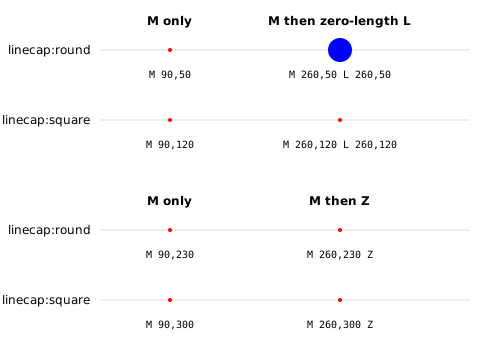
<path d="M 90,50" style="fill:none;stroke:blue;stroke-width:24;stroke-linecap:round;" />
<path d="M 260,50 L 260,50" style="fill:none; stroke:blue; stroke-width:24;stroke-linecap:round;" />

<path d="M 90,120" style="fill:none;stroke:blue;stroke-width:24;stroke-linecap:square;" />
<path d="M 260,120 L 260,120" style="fill:none;stroke:blue;stroke-width:24;stroke-linecap:square;" />

<path d="M 90,230" style="fill:none;stroke:black;stroke-width:24;stroke-linecap:round;" />
<path d="M 260,230 Z" style="fill:none;stroke:black;stroke-width:24;stroke-linecap:round;" />

<path d="M 90,300" style="fill:none; stroke:black; stroke-width:24; stroke-linecap:square;" />
<path d="M 260,300 Z" style="fill:none; stroke:black; stroke-width:24; stroke-linecap:square;" />
For that reason, svg_path.clean_subpath keeps one zero-length line if a
subpath consists only of zero-length lines, preserving the difference between a
zero-length subpath and a move-only subpath. It does this even for closed
subpaths, where the choice is mainly about preserving internal representation
consistency.
Concerning the detailed mechanics of subpath closure, a literal read of the
SVG 2 specification
plausibly suggests that Z means “draw a final line from the current point to
the starting point, even if this final line has length 0, and then mark
topological closure”. The observable behavior of user agents, however, suggests
that Z is commonly interpreted as meaning “draw a final line to the starting
point only if necessary to bridge a gap or when no segments have been added to
the subpath yet, and then mark topological closure”.
This library follows the latter interpretation.
Under this interpretation, a final nonzero-jump line that geometrically
closes a topologically closed subpath can be elided in the representation of
the subpath, shortening M0,0 L10,10 0,0 Z to M0,0 L10,10 Z. A final
zero-length jump followed by Z cannot be dropped without losing information,
so the serializer never drops zero-length lines, including immediately prior to
Z.
Transforming Paths
svg_path/transform applies SVG-style affine transforms to segments, subpaths,
and paths.
import svg_path/parse
import svg_path/serialize
import svg_path/transform

pub fn move_path_data(input: String) -> String {
  let assert Ok(path) = parse.path(input)
  let matrix = transform.translate(x: 10.0, y: 20.0)
  let assert Ok(path) = transform.path(path, by: matrix)

  serialize.path(path)
}
Transforms use the SVG six-value affine matrix:
matrix(a b c d e f)
which corresponds to:
x' = a*x + c*y + e
y' = b*x + d*y + f
Matrix values can be constructed and inspected as tuples:
import svg_path/transform

pub fn inspect_transform() -> #(Float, Float, Float, Float, Float, Float) {
  transform.rotate(degrees: 30.0)
  |> transform.to_tuple
}
Use chain(first:, then:) when thinking in application order. Use
multiply(left:, right:) when thinking in matrix multiplication order.
import svg_path/transform

pub fn scale_then_move() -> transform.Matrix {
  let scale = transform.scale(factor: 2.0)
  let move = transform.translate(x: 10.0, y: 20.0)

  // Applying scale, then move, is move * scale.
  transform.chain(first: scale, then: move)
  // transform.multiply(left: move, right: scale)
}
Transforms can also be applied about a point, or about one of the nine anchor points on a segment, subpath, or path bounding box:
TopLeft      TopCenter      TopRight
CenterLeft   Center         CenterRight
BottomLeft   BottomCenter   BottomRight
import svg_path
import svg_path/transform

pub fn flip_path_horizontally(
  path: svg_path.Path,
) -> Result(svg_path.Path, transform.Error) {
  path
  |> transform.path_about_anchor(
    by: transform.scale_xy(x: -1.0, y: 1.0),
    anchor: transform.Center,
  )
}
Transform Attributes
SVG transform attributes can be parsed and serialized separately from paths.
import svg_path/transform/parse
import svg_path/transform/serialize

pub fn tidy_transform_attribute(input: String) -> String {
  let assert Ok(matrix) = parse.attribute(input)

  serialize.to_string(matrix)
}
The transform parser accepts normal SVG transform syntax, including compound attributes such as:
translate(10)scale(2) skewX(3)
Transform serialization prefers readable SVG forms when the matrix can be recognized clearly:
translate(10 20)
translate(10 20)scale(2)
rotate(30)
translate(10 20)rotate(30)scale(2 3)
If no clearer representation is available, it falls back to:
matrix(a b c d e f)
Use force_matrix when you want the raw matrix form even if a shorter
transform expression could be detected.
import svg_path/transform
import svg_path/transform/serialize

pub fn raw_transform_attribute() -> String {
  transform.translate(x: 10.0, y: 20.0)
  |> serialize.to_string_with_options(
    options: serialize.default_options() |> serialize.force_matrix,
  )
}
Inspecting Paths
svg_path/inspect prints path data structures for debugging and tests. It is
not the SVG d serializer. Use inspect.segment, inspect.subpath, and
inspect.path for readable structural output:
import svg_path
import svg_path/inspect

pub fn inspect_line() -> String {
  svg_path.Line(
    start: svg_path.point(0.0, 0.0),
    end: svg_path.point(12.0, 10.0),
  )
  |> inspect.segment
}
Example output:
Line(start=0,0 end=12,10)
Use the _code functions when you want copy-pasteable Gleam:
import svg_path
import svg_path/inspect

pub fn inspect_code(path: svg_path.Path) -> String {
  inspect.path_code(path)
}
Example output:
svg_path.Path([
  svg_path.assert_subpath([
    svg_path.Line(start: svg_path.point(0.0, 0.0), end: svg_path.point(12.0, 10.0))
  ])
])
Inspection options mirror the serializer’s decimal controls: rounding, fixed
decimal places, and left padding are available through _with_options
functions.
Converting Matrices From matrix_gleam
svg_path does not depend on
matrix_gleam, but the tuple helpers
make the conversion small if your application uses both packages.
import matrix/mat3f
import svg_path/transform

pub fn to_mat3f(matrix: transform.Matrix) -> mat3f.Mat3f {
  let #(a, b, c, d, e, f) = transform.to_tuple(matrix)

  mat3f.new(
    a, b, 0.0,
    c, d, 0.0,
    e, f, 1.0,
  )
}
import matrix/mat3f
import svg_path/transform

pub type MatrixConversionError {
  NonAffineMatrix
}

pub fn from_mat3f(
  matrix: mat3f.Mat3f,
) -> Result(transform.Matrix, MatrixConversionError) {
  case matrix.x.z == 0.0 && matrix.y.z == 0.0 && matrix.z.z == 1.0 {
    False -> Error(NonAffineMatrix)
    True -> {
      Ok(transform.from_tuple(#(
        matrix.x.x,
        matrix.x.y,
        matrix.y.x,
        matrix.y.y,
        matrix.z.x,
        matrix.z.y,
      )))
    }
  }
}
Further documentation can be found at https://hexdocs.pm/svg_path.
Curve Clipping
svg_path/clip clips drawn geometry to a filled clipping region. This is not a
filled Boolean operation: the input path is treated as curves, and the clipping
path is treated as a filled region.
clip.subpath(input, to: clip_region, using: svg_path.Nonzero)
clip.path(input, to: clip_region, using: svg_path.Nonzero)

// Each returns Result(..., svg_path.Error)
The returned subpaths contain only pieces of the original input geometry. Boundary pieces from the clipping region are not inserted. If an open subpath enters, exits, and re-enters the clipping region, the result contains multiple open subpaths. If a closed circle is clipped by a rectangle, the result is the visible arc fragments as open subpaths, not a closed rectangle-and-arc outline.
Closed inputs stay closed only when the whole subpath survives without being cut by the clipping boundary. Pieces whose sample point is inside or on the boundary of the clipping region are retained. Segment types are preserved where possible: lines remain lines, Beziers remain Beziers, and arcs remain arcs after splitting.
CSG
CSG here means Boolean operations on the filled point-sets represented by SVG
paths: union, intersection, and difference. SVG specifies how to decide the
filled region of one path through fill-rule, and it specifies that open
subpaths are filled as if a closing line connected the final point back to the
start point. SVG does not specify a general CSG API for combining two arbitrary
paths into a new path, so svg_path/csg defines the returned-path and
numerical policy used by this package.
The API works directly on Path and returns Path, even for simple inputs.
Boolean operations can produce zero components, one component, multiple
components, holes, and islands inside holes.
csg.union(left, right, using:)
csg.intersection(left, right, using:)
csg.difference(left, minus: right, using:)
csg.simplify_nonzero_output(path)

// Each returns Result(svg_path.Path, svg_path.Error)
Each operation preserves same-fill-rule filled-set equivalence:
fill(csg.union(left, right, using: rule), using: rule)
  == fill(left, using: rule) union fill(right, using: rule)

fill(csg.intersection(left, right, using: rule), using: rule)
  == fill(left, using: rule) intersection fill(right, using: rule)

fill(csg.difference(left, minus: right, using: rule), using: rule)
  == fill(left, using: rule) difference fill(right, using: rule)
As filled sets, union and intersection are commutative; difference is
not. The using fill rule is part of the operation: repeated loops,
self-intersections, and nested subpaths can differ under Nonzero and
EvenOdd.
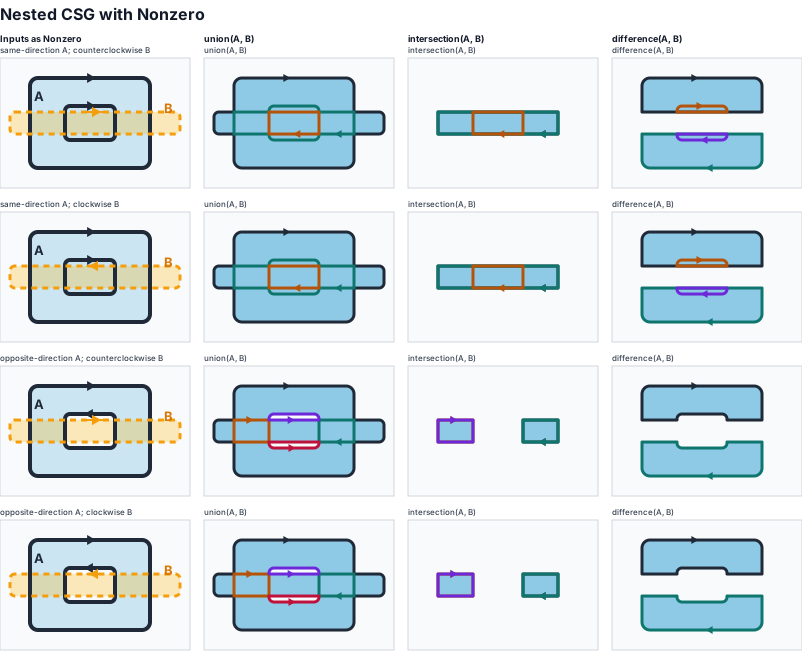
The returned path is not required to be a minimal outline. For Nonzero,
changes in absolute contour depth inside the filled set may be preserved: a
nested contour can remain visible in union even when both sides are filled
blue.
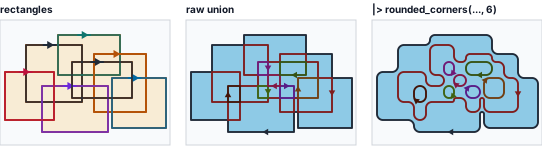
For example, the middle panel below is the raw Nonzero union of seven
overlapping rectangles. It keeps internal contour-depth lines. The right panel
applies effects.round_corners_with to that returned path, so the same contour
structure is visible with rounded corners.
Call csg.simplify_nonzero_output(path) to remove the internal
contour-depth boundaries after a CSG operation. It keeps boundaries
that separate filled and unfilled regions under Nonzero, removes boundaries
that only separate two filled regions of different contour depth, and returns a
path with the same Nonzero filled set.
Multiple subpaths are evaluated globally, just like area.path and
path_containment; they are not processed independently and then added. Empty
paths and move-only subpaths produce an empty filled set. Open subpaths are
implicitly closed for fill purposes.
For points that are not on a boundary:
| Operation | The point is inside the result when |
|---|---|
union(left, right) | the point is inside left or inside right |
intersection(left, right) | the point is inside left and inside right |
difference(left, minus: right) | the point is inside left and not inside right |
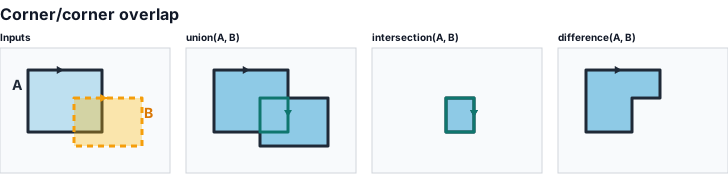
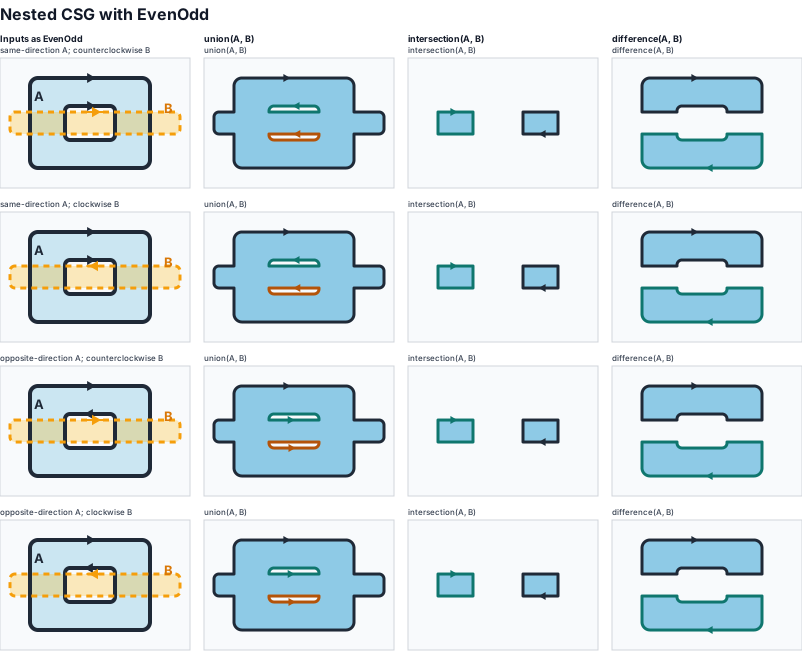
Input orientation matters only when it changes the input filled set. A single simple contour fills the same region in either direction, but nested contours can describe either a solid shape or a ring depending on orientation and fill rule.
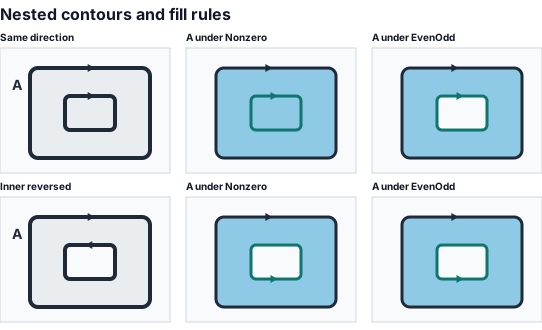
When a wider rectangle B crosses that nested path, union,
intersection, and difference depend on the filled set chosen by using.
The filled paths below are generated by the library; arrows, labels, panel
backgrounds, and dashed input outlines are only annotations.
Boundary points need explicit policy. For filled-set classification, the
result boundary is the boundary of the resulting filled set after the Boolean
operation. For returned-path construction, the output is assembled from pieces
where the output field changes: the shared internal edge between two simple
overlapping depth-1 shapes in union(left, right) is omitted, while the cut
edge in difference(left, minus: right) is kept. Under Nonzero, a deeper
nested contour can also be kept even when it is not a filled-set boundary.
Returned paths contain closed drawable subpaths, or Path([]) for the empty
result. Segment types are preserved where possible: line pieces stay lines,
Bezier pieces stay Beziers, and arc pieces stay arcs after splitting. The
returned path is oriented to fill correctly with the same rule used for the
operation; unforced internal Nonzero level contours default to clockwise.
If a case cannot be split or assembled into stable closed subpaths, the
operation returns an error rather than silently emitting an incoherent path.
Development
gleam test
gleam docs build